
System Upgrade Resource Center
Important Information on our System Upgrade
At First American Bank, we are committed to providing an exceptional banking experience. Beginning August 21, 2026, we will implement a system upgrade that will enhance service quality, modernize our technology, strengthen security, and deliver more convenience for your everyday banking.
Stay in the know and be prepared for upcoming changes, important dates, and any actions you may need to take before and after the upgrade.
Important Dates
| Friday, August 21 | Saturday, August 22 | Monday, August 24 |
| System upgrade begins at close of business day. | All First American Bank locations will be closed. | Our system upgrade will be complete. |
| Online and mobile banking will not be available beginning at 5:00pm MST. | All First American Bank locations will be open with normal business hours. | |
| First Line Telephone Banking will be unavailable starting at 5:00pm MST. | Online and mobile banking will resume. Download our new app from the App Store or Google Play Store! | |
| Current bill pay service will be removed from online and mobile banking. | First Line Telephone Banking will be restored. | |
| You can access our new bill pay service through online and mobile banking. |
What Will Stay the Same
- Your account number(s) will remain the same, except for
mortgage loan account numbers, see below for more information. - Your First American Bank routing number (112200439).
- Your existing debit card and PIN.
- Your personal and business checks, as well as deposit slips.
- Your automatic withdrawals and direct deposits will continue without interruption.
- Your deposit account statement cycle date will not change.
- Our website will remain the same: firstamericanbanknm.com.
What Will Change
Online Banking and Mobile App
Online Banking and our Mobile Banking App will be temporarily unavailable beginning at 5:00pm MST on
Friday, August 21. You may delete our app at this time.
Starting Monday, August 24 you can access Online Banking and our new Mobile Banking App.
Download the new app from the App Store or Google Play Store and search for ‘First American Bank Mobile.’


First Time Login
For your first login, use your current Username. Your initial password will be your zip code, followed by the last four digits of your Social Security Number. You will then be prompted to create a new password.
After the upgrade, your Online Banking and Mobile Banking experience will look different with an updated design.
You can preview and navigate our new online banking and mobile banking experience before they launch on August 24. Become familiar with the new design, menu options, and features you’ll use every day.
Important: The demos are for demonstration purposes only. Do not enter your username, password or personal information. Simply click through the screens to explore the demo.
Bill Pay
- Our current Bill Pay service will be removed from Online and Mobile Banking at 8:00am MST on August 20.
- Bill payments dated for August 26, will be the final payments processed. All payments dated greater than August 26 will be cancelled.
- You can access our new Bill Pay service on August 24 through Online Banking and on our new Mobile Banking App.
- Your existing Bill Pay payees will automatically transfer to the new Bill Pay service. However, recurring payments and ebills will not transfer and must be set up again in the new system. We recommend downloading your bill pay history before August 20 to use as a reference when setting up recurring payments and ebills.
First Line Telephone Banking
This service will be unavailable starting at 5:00pm MST on Friday, August 21 and is expected to be restored Monday, August 24.
After the upgrade, the PIN you currently use to access First Line Banking at 888.746.8300 will change. Your initial PIN will be your date of birth and last four digits of your Social Security Number, using the format below:
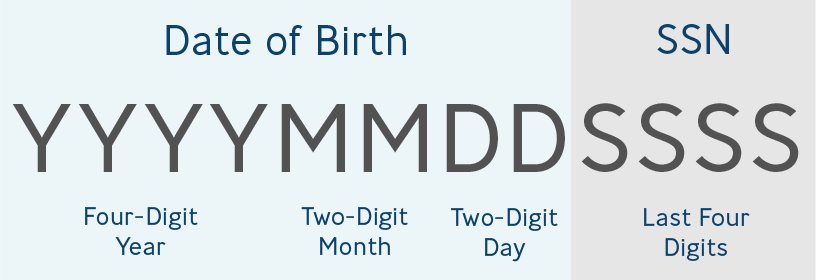
To keep your FIRST LINE account active, please call within 30 days of the upgrade. After 30 days, access is inactive and a bank representative can assist you to reset your access.
Paper Statement Fee
As previously disclosed, accounts receiving paper statements are subject to a paper statement fee listed on your monthly statement as ‘Service Charge.’ Effective August 24, 2026, this fee will now be clearly labeled ‘Paper Statement Fee’ on your account statements. No action is required on your part, and the fee amount itself is not changing.
Mortgage Loan Account Numbers
Your mortgage loan number will be changing from 12 digits to 8 digits. Digits 4–7 will be removed.

You may continue making your mortgage payment as usual. If you use a Bill Pay service, after August 24, please update your loan number with the provider to help ensure timely payment processing.
Debit Card Alerts & Sending Money
Debit card alerts and controls will be available to set up and manage in our new Mobile Banking App. Availability of these features is expected to closely coincide with the date of August 24. Alerts currently managed in the Brella App will be discontinued after the system upgrade.
Zelle® is coming soon and will be available through our new Mobile Banking App, making it easy to send and receive money.
Account Transfers
Recurring transfers you have set up through Online Banking or the Mobile Banking App will not transfer and must be set up again starting August 24.
Business Banking
eBusiness Banking and eBusiness Mobile App
eBusiness Online Banking and Mobile App will be temporarily unavailable beginning at 5:00pm MST on Friday, August 21. You may delete our app at this time.
Starting Monday, August 24, you can access eBusiness Online Banking and our new eBusiness Mobile App.
Download the new app from the App Store or Google Play Store and search for ‘First American Bank eBiz.’
First Time Login
For your first login, use your current username. Your temporary password has been provided to you separately by our Treasury Management Team. Please contact Treasury Management if you have not received your login credentials.
After the upgrade, your eBusiness Online Banking and Mobile experience will look different with an updated design.
Take a tour of the new eBusiness Online Banking experience today before it launches on August 24. Preview the new look, browse the menu options, and familiarize yourself with the new navigation.
Important: This demo is for demonstration purposes only. Do not enter your username, password or personal information. Simply click through the screens to continue the demo.
Business Bill Pay
- Our new eBusiness Bill Pay service will be available beginning Monday, August 24.
- Payments scheduled through our current Bill Pay service will be processed on August 20 and paid on August 21.
- Online and Mobile Bill Pay Access. Access to Bill Pay through online banking and mobile banking will end at 2:00pm MST on August 20.
- Payment History. Existing recurring payments and ebills will not transfer and will need to be set up again. To retain your Bill Pay payment history, please download it before 2:00pm MST on August 20. Payment history will not be available after that time.
- Outstanding & Returned Check Payments. Any Bill Pay checks that are not cashed within 90 days will be refunded to your account. After the upgrade, if a merchant returns a Bill Pay
check, it will be sent back to First American Bank for processing.
Business Paper Statement Fee
As previously disclosed, accounts receiving paper statements are subject to a paper statement fee listed on your monthly statement as ‘Service Charge’ or ‘Cycle Statements.’ Effective August 24, this fee will now be clearly labeled as ‘Paper Statement Fee’ or ‘Business Paper Statement Fee’ on your account statements. No action is required on your part, and the fee amount itself is not changing.
Treasury Management Services
A separate communication was sent to Business Banking customers utilizing Treasury Management services with additional information regarding the services below and more:
- eBusiness Online Banking
- User Profiles
- Account Transfers & Templates
- ACH, Wires & Templates
- Positive Pay
- QuickBooks
- Scheduled Transfers
- Statements
Support and Assistance
We’re here to help! Our team is working diligently to make this upgrade as smooth as possible for you. Should you have any questions, please contact us:
Local Branch
You may visit or call your local First American Bank branch with any questions you may have. Our employees will be able to provide assistance leading up to the upgrade.
Customer Care: 800.289.6140
Our dedicated Customer Care team is available to answer your questions.
Bank Website
Visit our website for the latest updates and most current information regarding our system upgrade.
Frequently Asked Questions
Why are we upgrading?
This is a necessary step forward in improving efficiencies, strengthening our systems, and to offer better tools to enhance our customer’s day-to-day banking experience.
When will the upgrade happen?
We will begin our system upgrade after the close of business day on Friday, August 21.
Will branch hours be affected during the system upgrade?
We will operate with normal business hours on Friday, August 21. Only branches open on Saturdays will be impacted – Las Cruces and Silver City branches will be closed on Saturday, August 22. We will open with normal business hours on Monday, August 24.
Will I have access to my funds?
Yes, your current debit card will work during the upgrade and you will have access to your funds at ATMs. Although First American Bank ATM service interruptions are not expected, you may experience occasional delays during the system upgrade.
Will I need a new debit card?
No, your existing First American Bank debit card will continue to work before, during and after the upgrade period.
Will there be changes to my statements?
There will be minor updates to your statements, but they will look similar to your current statements.
All deposit accounts except Christmas Club will have an August 23, 2026 ending statement with the upgrade. The next deposit account statement will be on your normal deposit account statement cycle date.
Will any fees or service charges change?
If your account is currently charged for paper statements, the fee will now appear as ‘Paper Statement Fee’ instead of ‘Service Charge.’ No action is required on your part and the amount of the fee itself is not changing.
Will I need a new username and password for Online and Mobile Banking?
Your username will remain the same. When you first login after the system upgrade, use your current username.
Personal Banking Customers: Your temporary password will be your zip code followed by the last four digits of your Social Security Number.
Business Banking Customers: Your temporary password has been provided separately by our Treasury Management Team. Please contact Treasury Management if you have not received your login credentials.
Will I have to update my current automatic withdrawals and direct deposits?
No, your automatic withdrawals and direct deposits will continue without interruption.
Will my account transfers change?
Any automatic transfer or payment that was set up at First American Bank will not change. Recurring transfers you have set up through Online Banking or the Mobile Banking App will not transfer and must be set up again starting August 24.
Can I continue making my mortgage payment as usual?
Yes, you may continue making your mortgage payment as usual. If you use a Bill Pay service, after August 24, please update your loan number with the provider to help ensure timely payment processing.
Will the Brella App still be available?
No, the Brella App will be discontinued after the system upgrade. Debit card alerts and controls will be available to set up and manage in our new Mobile Banking App. Availability of these features is expected to closely coincide with the date of August 24; more details will be provided as they become available.